2. Easing
Without easing, values move at constant speed and stop abruptly at each key. Easing changes the speed between keys, so motion feels natural. In Keyed, easing is set on a key with Key.at(t) instead of a plain time.
Influence
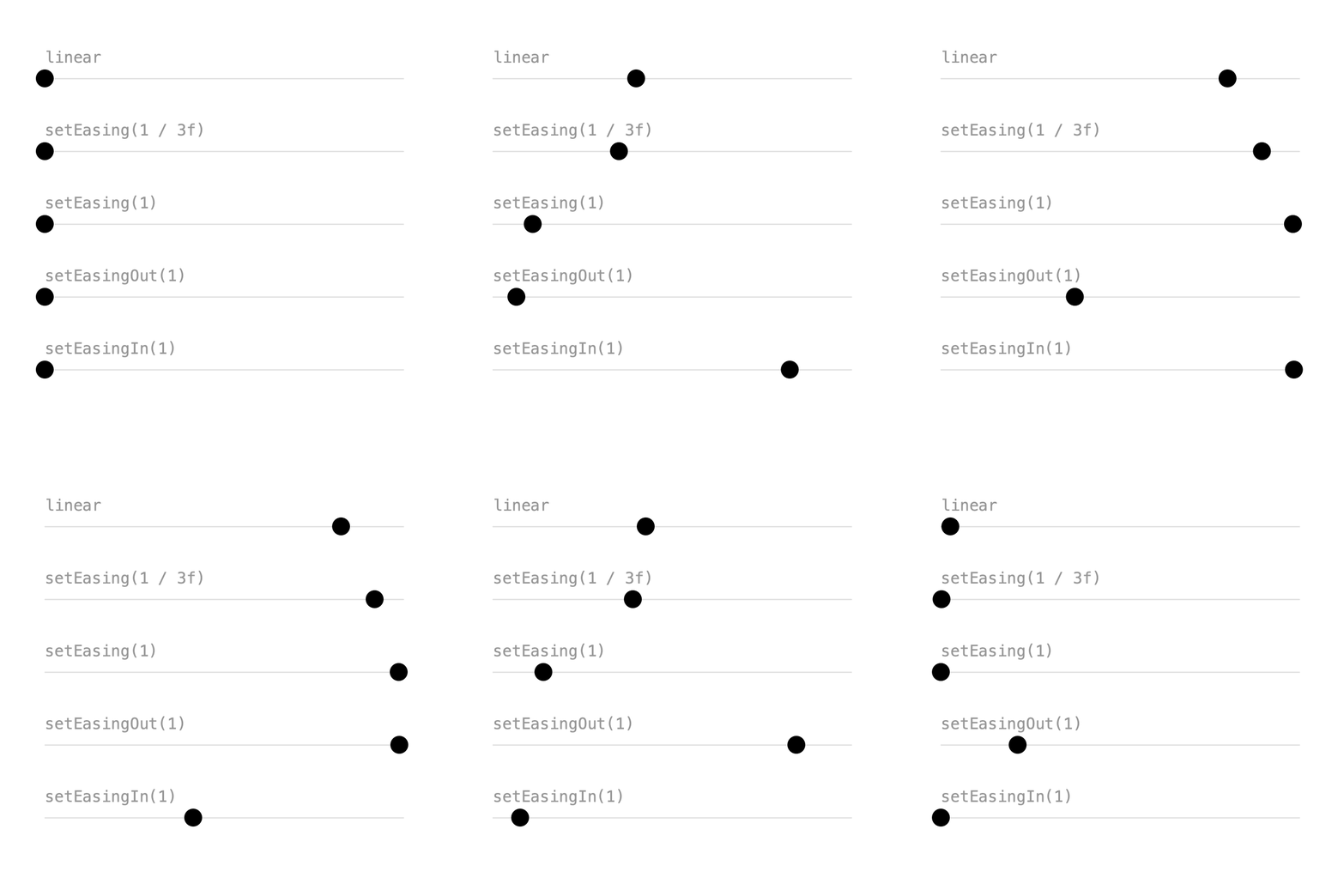
Inspired by After Effects, easing is an influence between 0 and 1 that slows the motion near a key.
easy = Keyed.ofFloat()
    .key(Key.at(0).setEasing(1 / 3f), x0)
    .key(Key.at(1.5f).setEasing(1 / 3f), x1)
    .key(Key.at(3).setEasing(1 / 3f), x0);
setEasing(1 / 3f)is similar to After Effects' Easy Ease.- Higher influence, like
setEasing(1), is slower near the keys and faster in between. setEasingOut()only eases leaving a key: soft start, hard stop.setEasingIn()only eases arriving at a key: hard start, soft stop.
Full sketch: Influence
import ch.domizai.keyed.*;

float x0 = 40, x1 = 360;

Keyed<Float> linear, easy, strong, easeOut, easeIn;

void settings() {
    size(400, 400);
}

void setup() {
    Keyed.init(this).setDuration(3);
    textFont(createFont("Courier", 14));
    textAlign(LEFT, CENTER);

    // Without easing the speed is constant and stops are abrupt.
    linear = Keyed.ofFloat()
        .key(0, x0)
        .key(1.5f, x1)
        .key(3, x0);

    // Influence in [0, 1] slows the motion near a key, like in After Effects.
    // 1/3 on both sides of a key is After Effects' Easy Ease.
    easy = Keyed.ofFloat()
        .key(Key.at(0).setEasing(1 / 3f), x0)
        .key(Key.at(1.5f).setEasing(1 / 3f), x1)
        .key(Key.at(3).setEasing(1 / 3f), x0);

    // More influence: slower near the keys, faster in between.
    strong = Keyed.ofFloat()
        .key(Key.at(0).setEasing(1), x0)
        .key(Key.at(1.5f).setEasing(1), x1)
        .key(Key.at(3).setEasing(1), x0);

    // setEasingOut() only eases leaving a key: soft start, hard stop.
    easeOut = Keyed.ofFloat()
        .key(Key.at(0).setEasingOut(1), x0)
        .key(Key.at(1.5f).setEasingOut(1), x1)
        .key(Key.at(3).setEasingOut(1), x0);

    // setEasingIn() only eases arriving at a key: hard start, soft stop.
    easeIn = Keyed.ofFloat()
        .key(Key.at(0).setEasingIn(1), x0)
        .key(Key.at(1.5f).setEasingIn(1), x1)
        .key(Key.at(3).setEasingIn(1), x0);
}

void draw() {
    background(255);
    lane("linear", 70, linear);
    lane("setEasing(1 / 3f)", 135, easy);
    lane("setEasing(1)", 200, strong);
    lane("setEasingOut(1)", 265, easeOut);
    lane("setEasingIn(1)", 330, easeIn);
}

void lane(String label, float y, Keyed<Float> x) {
    noStroke();
    fill(150);
    text(label, x0, y - 20);

    stroke(220);
    line(x0, y, x1, y);

    noStroke();
    fill(0);
    circle(x.value(), y, 16);
}
Presets
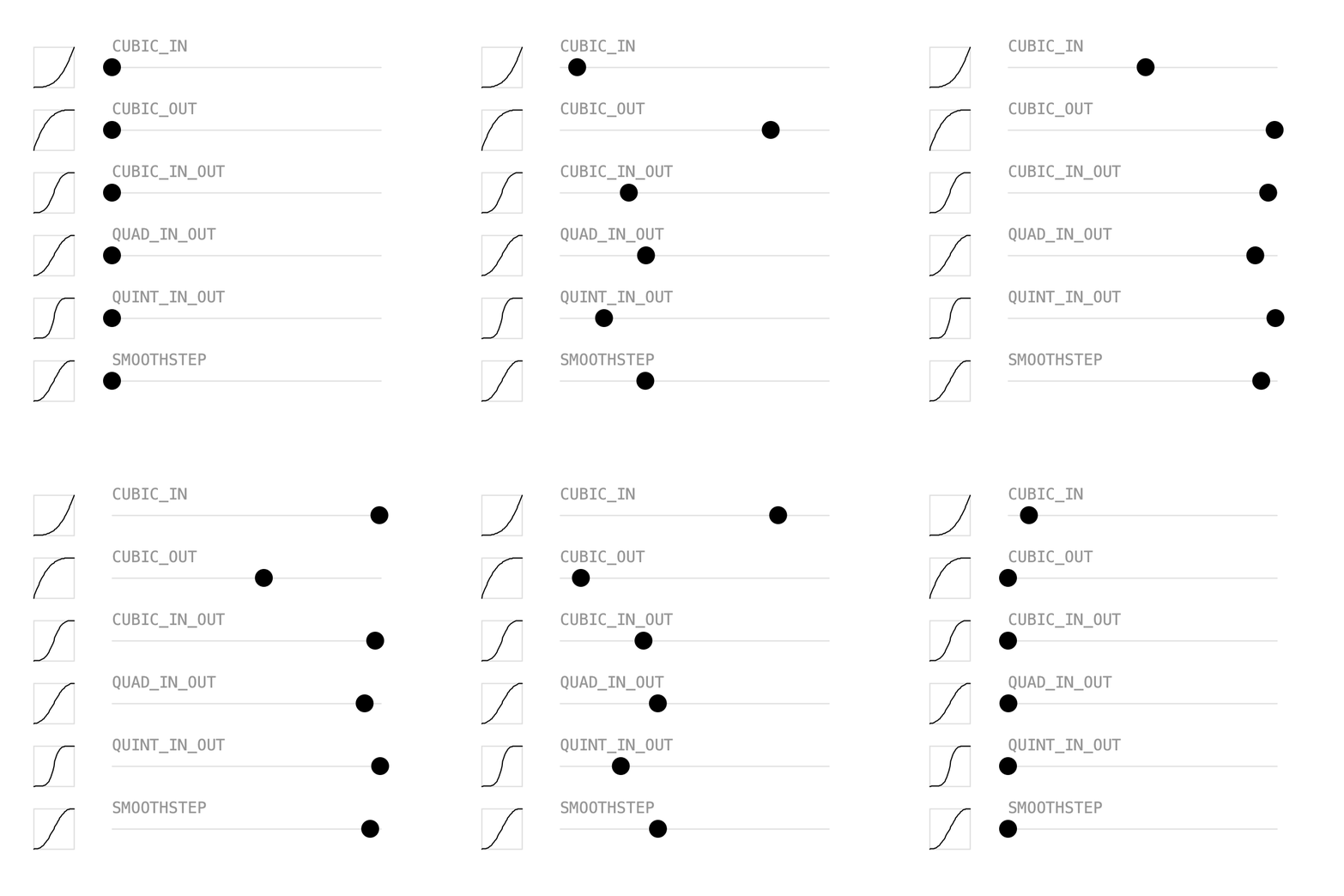
setEasing() also accepts an Easing curve. Keyed has the usual presets:
QUAD,CUBIC,QUARTandQUINT, each with_IN,_OUTand_IN_OUT, e.g.Easing.CUBIC_IN_OUTEasing.SMOOTHSTEPandEasing.HOLD
An Easing shapes the whole segment from its key to the next one, so the last key doesn't need one:
Keyed.ofFloat()
    .key(Key.at(0).setEasing(Easing.CUBIC_IN_OUT), x0)
    .key(Key.at(1.5f).setEasing(Easing.CUBIC_IN_OUT), x1)
    .key(3, x0);
An Easing is just a function from linear progress to eased progress, both from 0 to 1. Call apply(d) to use it yourself, e.g. to draw the little graphs in the sketch. The presets also exist as plain functions, like Easing.quadIn(x).
Full sketch: Presets
import java.util.ArrayList;

import ch.domizai.keyed.*;

float x0 = 100, x1 = 340;

// There are IN, OUT and IN_OUT presets for QUAD, CUBIC, QUART and QUINT,
// plus SMOOTHSTEP and HOLD.
String[] names = {
    "CUBIC_IN",
    "CUBIC_OUT",
    "CUBIC_IN_OUT",
    "QUAD_IN_OUT",
    "QUINT_IN_OUT",
    "SMOOTHSTEP"
};

Easing[] easings = {
    Easing.CUBIC_IN,
    Easing.CUBIC_OUT,
    Easing.CUBIC_IN_OUT,
    Easing.QUAD_IN_OUT,
    Easing.QUINT_IN_OUT,
    Easing.SMOOTHSTEP
};

ArrayList<Keyed<Float>> lanes = new ArrayList<>();

void settings() {
    size(400, 400);
}

void setup() {
    Keyed.init(this).setDuration(3);
    textFont(createFont("Courier", 14));
    textAlign(LEFT, CENTER);

    for (Easing e : easings) {
        // An Easing shapes the whole segment from its key to the next one,
        // so the last key doesn't need one.
        lanes.add(Keyed.ofFloat()
            .key(Key.at(0).setEasing(e), x0)
            .key(Key.at(1.5f).setEasing(e), x1)
            .key(3, x0));
    }
}

void draw() {
    background(255);
    for (int i = 0; i < lanes.size(); i++) {
        float y = 60 + i * 56;
        graph(easings[i], 30, y);
        lane(names[i], y, lanes.get(i));
    }
}

// An Easing is a function from linear progress to eased progress, both 0..1.
void graph(Easing e, float x, float y) {
    float s = 36;
    noFill();
    stroke(220);
    rect(x, y - s / 2, s, s);
    stroke(0);
    beginShape();
    for (int i = 0; i <= 40; i++) {
        float d = i / 40f;
        vertex(x + d * s, y + s / 2 - e.apply(d) * s);
    }
    endShape();
}

void lane(String label, float y, Keyed<Float> x) {
    noStroke();
    fill(150);
    text(label, x0, y - 20);

    stroke(220);
    line(x0, y, x1, y);

    noStroke();
    fill(0);
    circle(x.value(), y, 16);
}
Custom curves
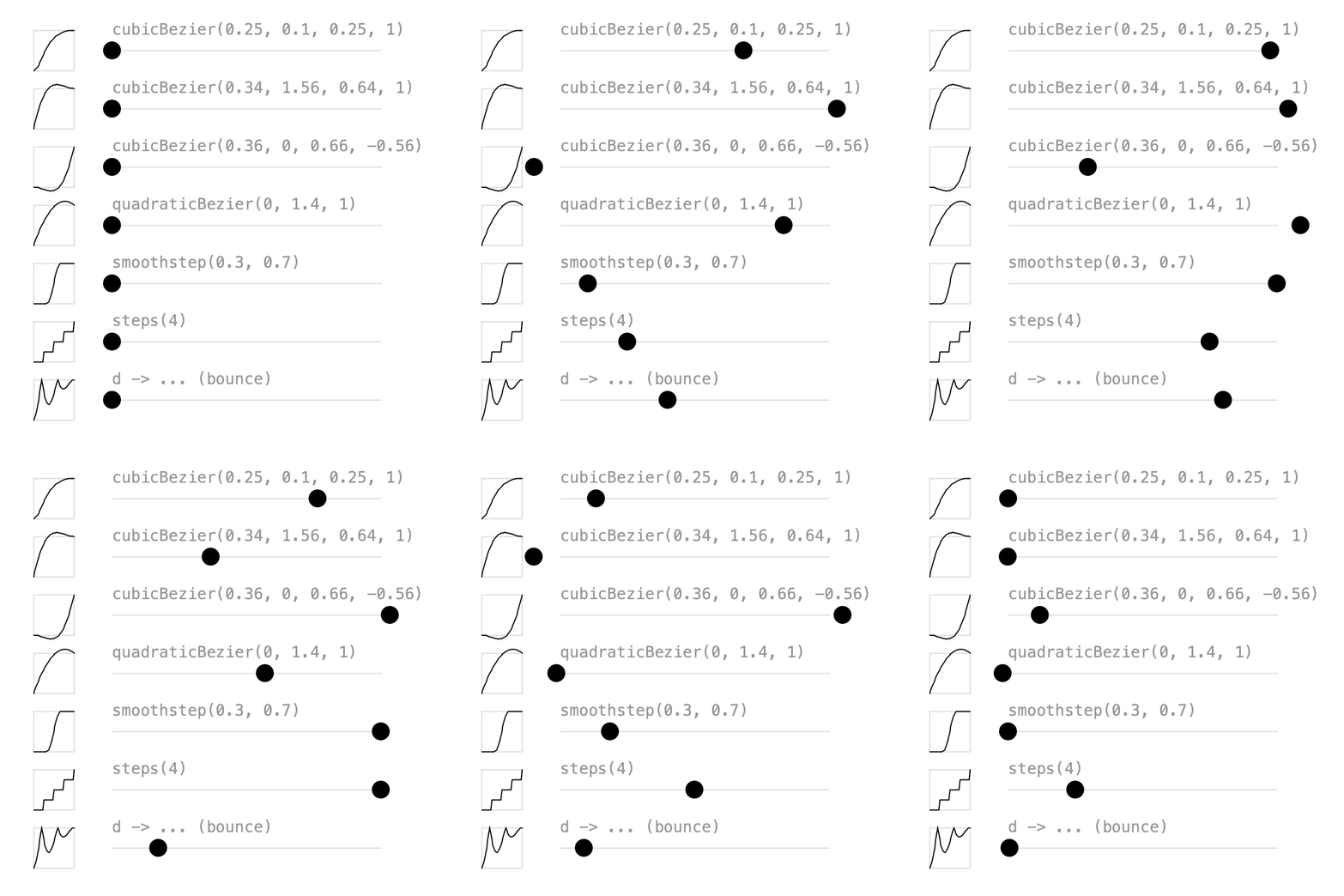
When the presets aren't enough, build your own:
// Same as CSS cubic-bezier(); this one is CSS "ease".
Easing.cubicBezier(0.25f, 0.1f, 0.25f, 1)
// y values above 1 overshoot the target...
Easing.cubicBezier(0.34f, 1.56f, 0.64f, 1)
// ...and below 0 pull back before moving.
Easing.cubicBezier(0.36f, 0, 0.66f, -0.56f)
// Starts at 0, ends at 1, pulled towards the middle value.
Easing.quadraticBezier(0, 1.4f, 1)
// Waits until 0.3, moves smoothly, arrives at 0.7.
Easing.smoothstep(0.3f, 0.7f)
// Jumps in 4 equal steps, like CSS steps().
Easing.steps(4)
Easing is a functional interface, so any function of d works too. This one bounces:
There are also Easing.powerIn(p), powerOut(p) and powerInOut(p) for any power.
Full sketch: CustomBezier
import java.util.ArrayList;

import ch.domizai.keyed.*;

float x0 = 100, x1 = 340;

String[] names = {
    "cubicBezier(0.25, 0.1, 0.25, 1)",
    "cubicBezier(0.34, 1.56, 0.64, 1)",
    "cubicBezier(0.36, 0, 0.66, -0.56)",
    "quadraticBezier(0, 1.4, 1)",
    "smoothstep(0.3, 0.7)",
    "steps(4)",
    "d -> ... (bounce)"
};
Easing[] easings;

ArrayList<Keyed<Float>> lanes = new ArrayList<>();

void settings() {
    size(400, 400);
}

void setup() {
    Keyed.init(this).setDuration(3);
    textFont(createFont("Courier", 14));
    textAlign(LEFT, CENTER);

    easings = new Easing[] {
        // Same as CSS cubic-bezier(); this one is CSS "ease".
        Easing.cubicBezier(0.25f, 0.1f, 0.25f, 1),
        // y values above 1 overshoot the target...
        Easing.cubicBezier(0.34f, 1.56f, 0.64f, 1),
        // ...and below 0 pull back before moving.
        Easing.cubicBezier(0.36f, 0, 0.66f, -0.56f),
        // Starts at 0, ends at 1, pulled towards the middle value.
        Easing.quadraticBezier(0, 1.4f, 1),
        // Waits until 0.3, moves smoothly, arrives at 0.7.
        Easing.smoothstep(0.3f, 0.7f),
        // Jumps in 4 equal steps, like CSS steps().
        Easing.steps(4),
        // Easing is a functional interface, so any function of d works.
        // This one hits the target, bounces back twice and settles.
        d -> 1 - abs(cos(d * 2.5f * PI)) * (1 - d)
    };

    for (Easing e : easings) {
        lanes.add(Keyed.ofFloat()
            .key(Key.at(0).setEasing(e), x0)
            .key(Key.at(1.5f).setEasing(e), x1)
            .key(3, x0));
    }
}

void draw() {
    background(255);
    for (int i = 0; i < lanes.size(); i++) {
        float y = 45 + i * 52;
        graph(easings[i], 30, y);
        lane(names[i], y, lanes.get(i));
    }
}

void graph(Easing e, float x, float y) {
    float s = 36;
    noFill();
    stroke(220);
    rect(x, y - s / 2, s, s);
    stroke(0);
    beginShape();
    for (int i = 0; i <= 40; i++) {
        float d = i / 40f;
        vertex(x + d * s, y + s / 2 - e.apply(d) * s);
    }
    endShape();
}

void lane(String label, float y, Keyed<Float> x) {
    noStroke();
    fill(150);
    text(label, x0, y - 20);

    stroke(220);
    line(x0, y, x1, y);

    noStroke();
    fill(0);
    circle(x.value(), y, 16);
}
Hold
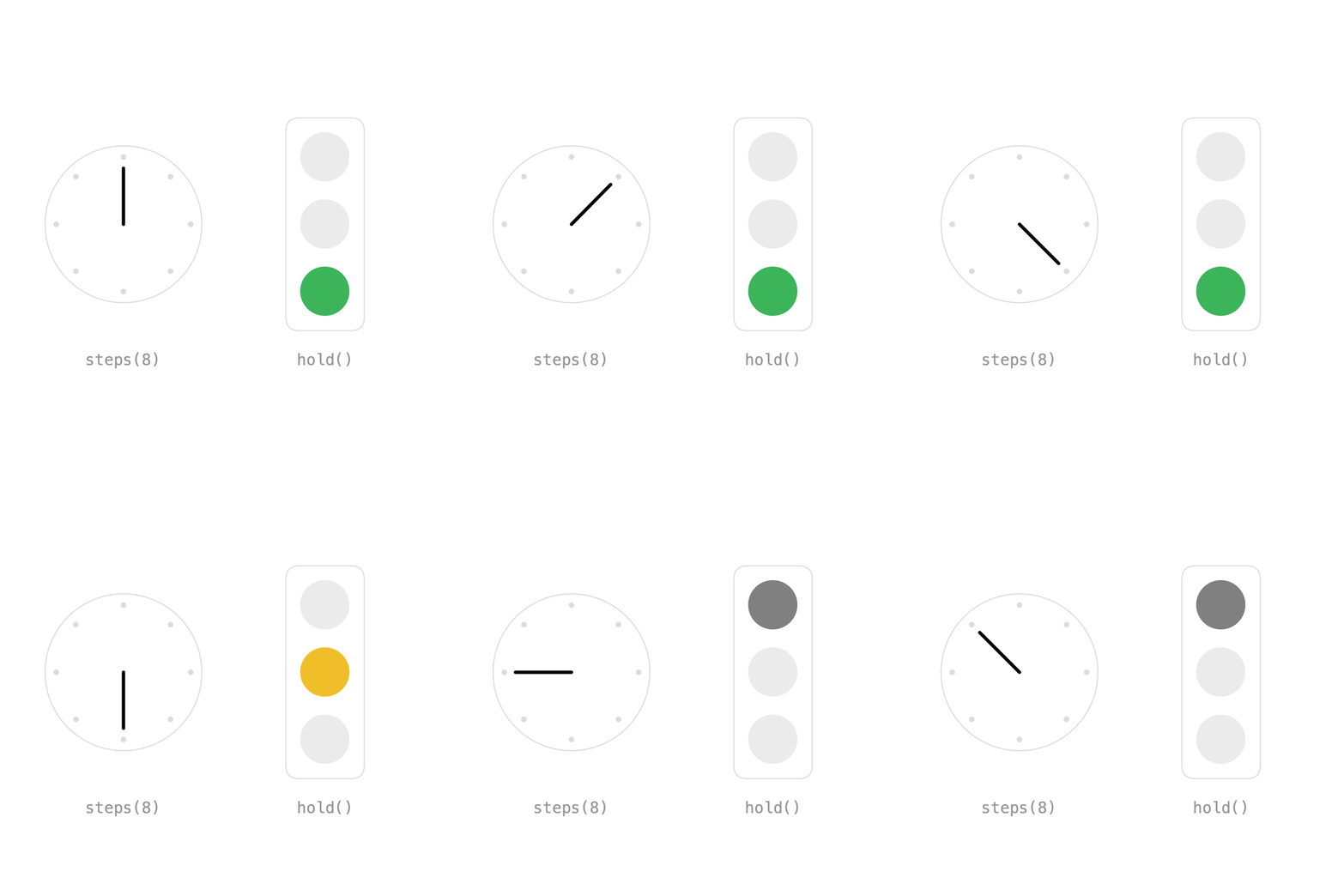
Sometimes values should jump instead of blend. There are two ways:
- Even jumps:
Easing.steps(n)on a single segment. The clock hand makes one full turn in 8 equal steps. - Uneven timing:
hold()keeps a key's value until the next key. The traffic light is green for 2 seconds, yellow for 0.5 and red for 1.5.
hand = Keyed.ofFloat()
    .key(Key.at(0).setEasing(Easing.steps(8)), 0f)
    .key(4, TWO_PI);

lamp = Keyed.ofInt()
    .key(Key.at(0).hold(), 2)
    .key(Key.at(2).hold(), 1)
    .key(2.5f, 0);
Without hold(), the lamp index would be blended and rounded, switching halfway between keys.
Full sketch: Hold
import ch.domizai.keyed.*;

int ticks = 8;
Keyed<Float> hand;
Keyed<Integer> lamp;
int[] lampColors;

void settings() {
    size(400, 400);
}

void setup() {
    Keyed.init(this).setDuration(4);
    textFont(createFont("Courier", 14));
    textAlign(CENTER, CENTER);

    // Even jumps: one full turn in 8 equal steps,
    // with a stepped easing on a single segment.
    hand = Keyed.ofFloat()
        .key(Key.at(0).setEasing(Easing.steps(ticks)), 0f)
        .key(4, TWO_PI);

    // Uneven timing: green for 2 seconds, yellow for 0.5, red for 1.5.
    // hold() keeps a key's value until the next key. Without it the lamp
    // index would be blended and rounded, switching halfway between keys.
    lamp = Keyed.ofInt()
        .key(Key.at(0).hold(), 2)
        .key(Key.at(2).hold(), 1)
        .key(2.5f, 0);

    // Red, yellow and green, from top to bottom.
    lampColors = new int[] {
        color(230, 60, 60),
        color(240, 190, 40),
        color(60, 180, 90)
    };
}

void draw() {
    background(255);
    clock("steps(8)", 110, 200, hand.value());
    trafficLight("hold()", 290, 200, lamp.value());
}

void clock(String label, float x, float y, float angle) {
    float r = 70;

    noFill();
    stroke(220);
    circle(x, y, r * 2);
    strokeWeight(5);
    for (int i = 0; i < ticks; i++) {
        float a = i * TWO_PI / ticks - HALF_PI;
        point(x + cos(a) * (r - 10), y + sin(a) * (r - 10));
    }

    stroke(0);
    strokeWeight(3);
    float a = angle - HALF_PI;
    line(x, y, x + cos(a) * (r - 20), y + sin(a) * (r - 20));
    strokeWeight(1);

    noStroke();
    fill(150);
    text(label, x, y + 120);
}

void trafficLight(String label, float x, float y, int lit) {
    noFill();
    stroke(220);
    rect(x - 35, y - 95, 70, 190, 12);

    noStroke();
    for (int i = 0; i < 3; i++) {
        fill(i == lit ? lampColors[i] : color(235));
        circle(x, y - 60 + i * 60, 44);
    }

    fill(150);
    text(label, x, y + 120);
}
Next: Timelines.