9. Composition
So far all animations were set up once in setup(). But what if you need the same animation many times, starting at different moments, like a burst on every click? A Composition is a reusable, self-contained animation on its own timeline. Like any class, it can take parameters, so every instance can look a little different.
Click burst
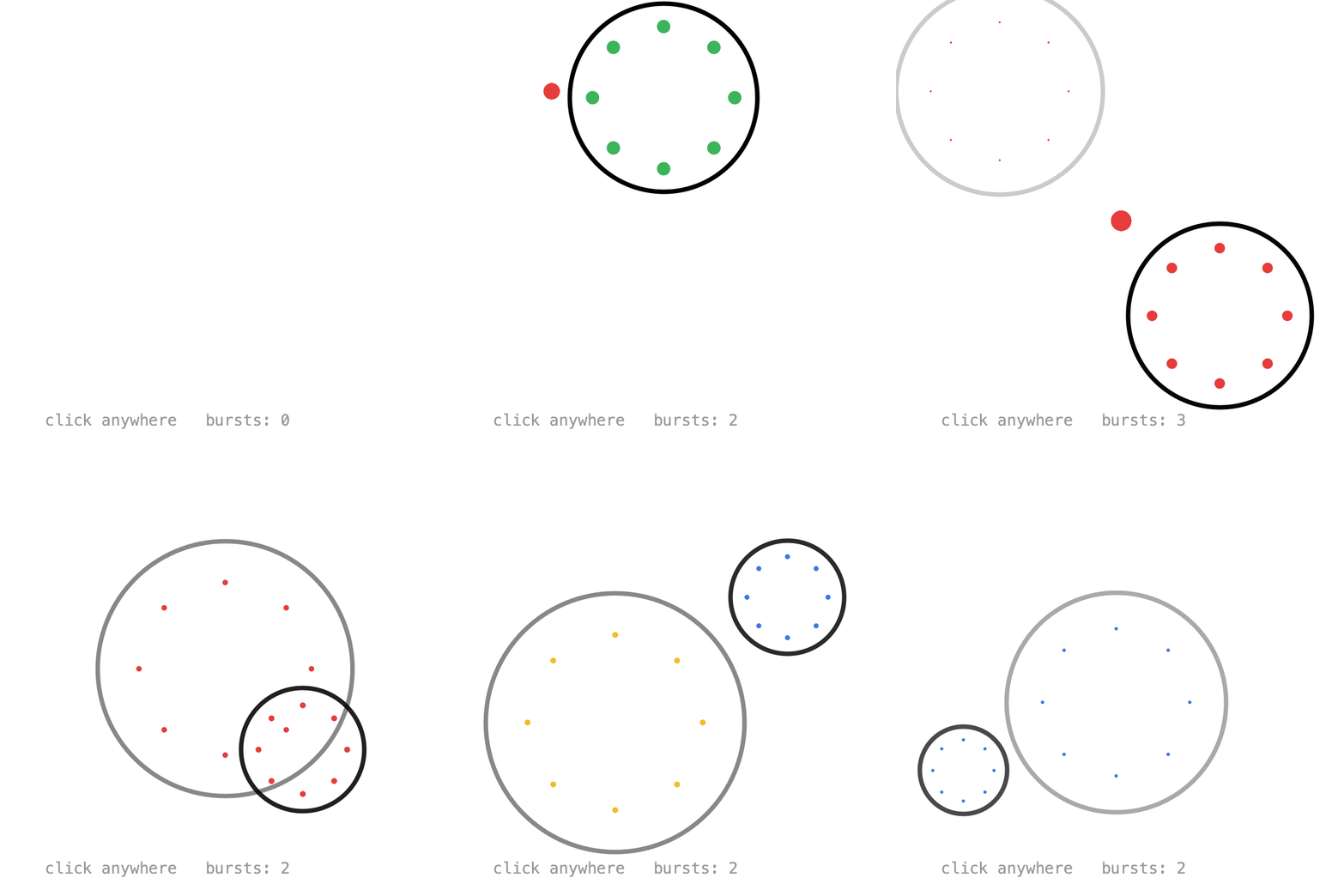
Extend Composition, pass its duration to super(), and create its values with add(). Key times are local: 0 is when the composition was created.
The constructor parameters customize each burst: size scales the keyed values, col colors the dots, and duration sets how long it plays. The key times are fractions of the duration, so the whole animation stretches with it:
class Burst extends Composition {
    PApplet g;
    float x, y;
    int col;
    Keyed<Float> ring, fade;

    Burst(PApplet g, float x, float y, float size, int col, float duration) {
        // A timeline of its own that plays once.
        super(duration);
        this.g = g;
        this.x = x;
        this.y = y;
        this.col = col;
        float d = duration;

        ring = add(Keyed.ofFloat()
            .key(Key.at(0).setEasing(Easing.CUBIC_OUT), 0f)
            .key(d, 90f * size));

        fade = add(Keyed.ofFloat()
            .key(0.4f * d, 255f)
            .key(d, 0f));
    }

    void draw() {
        g.noFill();
        g.stroke(0, fade.value());
        g.circle(x, y, ring.value() * 2);
        ...
    }
}
Each new Burst starts playing right away, here with a random size and color. Bigger bursts get a longer duration:
void mousePressed() {
    spawn(mouseX, mouseY);
}

void spawn(float x, float y) {
    float size = random(0.4f, 1.6f);
    int col = colors[(int) random(colors.length)];
    float duration = 0.4f + 0.5f * size;
    bursts.add(new Burst(this, x, y, size, col, duration));
}
Once a burst isFinished(), dispose() stops its timeline so it can be garbage collected:
void draw() {
    background(255);
    for (int i = bursts.size() - 1; i >= 0; i--) {
        Burst b = bursts.get(i);
        b.draw();
        if (b.isFinished()) {
            b.dispose();
            bursts.remove(i);
        }
    }
}
Call play() to restart a composition from the beginning, and timeline() to control it like any other timeline.
The sketch also spawns a burst every 0.4 seconds with onLoop(), so there is something to see without clicking.
Full sketch: ClickBurst
import java.util.ArrayList;

import ch.domizai.keyed.*;

ArrayList<Burst> bursts = new ArrayList<>();
int[] colors;

void settings() {
    size(400, 400);
}

void setup() {
    textFont(createFont("Courier", 14));

    colors = new int[] {
        color(230, 60, 60),
        color(240, 190, 40),
        color(60, 120, 230),
        color(60, 180, 90)
    };

    // Starts a burst every 0.4 seconds, so there is something to see.
    Keyed.init(this)
        .setDuration(0.4f)
        .onLoop(tm -> spawn(random(60, 340), random(60, 320)));
}

void mousePressed() {
    spawn(mouseX, mouseY);
}

// The same Burst every time, but each one gets its own size, color and duration.
// Each one plays on its own, starting right away.
void spawn(float x, float y) {
    float size = random(0.4f, 1.6f);
    int col = colors[(int) random(colors.length)];
    // Bigger bursts take longer.
    float duration = 0.4f + 0.5f * size;
    bursts.add(new Burst(this, x, y, size, col, duration));
}

void draw() {
    background(255);

    // Backwards, so finished bursts can be removed while looping.
    for (int i = bursts.size() - 1; i >= 0; i--) {
        Burst b = bursts.get(i);
        b.draw();
        if (b.isFinished()) {
            // Stops its timeline so it can be garbage collected.
            b.dispose();
            bursts.remove(i);
        }
    }

    fill(150);
    text("click anywhere   bursts: " + bursts.size(), 40, 380);
}
import ch.domizai.keyed.*;

// A reusable animation: extend Composition and create its values with add().
// Constructor parameters make every instance a little different.
class Burst extends Composition {
    PApplet g;
    float x, y;
    int col;
    Keyed<Float> ring, fade, spread, dotSize;

    // size scales the burst, col colors its dots, and duration is how long it plays.
    Burst(PApplet g, float x, float y, float size, int col, float duration) {
        // A timeline of its own that plays once.
        super(duration);
        this.g = g;
        this.x = x;
        this.y = y;
        this.col = col;

        // add() puts a value on this composition's timeline.
        // Key times are local: 0 is when this burst was created.
        // Here they are fractions of the duration, so the timing stretches with it.
        float d = duration;

        ring = add(Keyed.ofFloat()
            .key(Key.at(0).setEasing(Easing.CUBIC_OUT), 0f)
            .key(d, 90f * size));

        fade = add(Keyed.ofFloat()
            .key(0.4f * d, 255f)
            .key(d, 0f));

        spread = add(Keyed.ofFloat()
            .key(Key.at(0).setEasing(Easing.QUART_OUT), 0f)
            .key(d, 60f * size));

        dotSize = add(Keyed.ofFloat()
            .key(0, 14f * size)
            .key(d, 0f));
    }

    void draw() {
        g.noFill();
        g.stroke(0, fade.value());
        g.strokeWeight(4);
        g.circle(x, y, ring.value() * 2);
        g.strokeWeight(1);

        g.noStroke();
        g.fill(col);
        for (int i = 0; i < 8; i++) {
            float a = i * PApplet.TWO_PI / 8;
            float r = spread.value();
            g.circle(x + PApplet.cos(a) * r, y + PApplet.sin(a) * r, dotSize.value());
        }
    }
}
Next: Export.